
Platform guide
This guide explains what the Innovation platform is for, its roles and what each role can do, its features, how an idea moves through it from submission to measured impact, and which page or export of the platform answers each Qiyas requirement. The glossary at the end gives every term in Arabic and English.
Why the platform exists
The Innovation platform turns ideas from employees and beneficiaries into delivered initiatives with measurable impact. It does this through a clear, fair and transparent path, from the moment an idea is submitted to the moment its results are published.
The problem it solves is common in government entities. Good ideas get lost in email and meetings. The person who proposed an idea does not know what happened to it. Decisions rest on impressions, not on published criteria. The platform collects ideas in one place, scores them against weighted criteria, puts them to a pilot, and measures the initiatives they become against the organisation's strategic goals.
The platform rests on two principles:
- Transparency: every rejection has a written reason that the idea's author can see. Every score shows how it was made up. Every decision is kept in a log that cannot be edited. Every delivered initiative names the idea it came from.
- Fair evaluation: each expert scores without seeing colleagues' scorecards until they have submitted their own. The community's view is calculated with a statistical method, so an idea with one vote cannot outrank an idea backed by dozens of people.
The intended result for the entity: an organised pool of ideas, decisions it can justify, initiatives measured against targets, and the evidence Qiyas asks for, produced by the daily work rather than assembled at the end of the year.
What the platform is
Innovation is a bilingual web portal. Arabic is the main language and English is its translation. It is built on the Platforms Code design identity issued by the Digital Government Authority (DGA). Anyone can visit it and browse without an account. To take part, a visitor requests an account and the platform manager approves it, or the platform manager creates the account directly.
The platform manages seven main elements:
| Element | What it is | Example |
|---|---|---|
| Idea | A proposal to improve a service or a procedure, submitted by any member: the problem, the proposed solution and how it addresses the problem | Booking appointments with several government entities from one app |
| Challenge | A time-limited call that the entity opens on a specific problem, with open and close dates, evaluation criteria, the targets it serves and a prize or incentive | "The paperless challenge" |
| Evaluation | A scorecard that an assigned expert fills in for one idea, against weighted criteria | Impact 35%, Feasibility 30%, Originality 20%, Sustainability 15% |
| Initiative | An approved idea, after its pilot, turned into a project with a project lead, a budget, milestones and measured contributions to targets | A SAR 150,000 initiative with three milestones, expected to save 12,000 working hours |
| Strategic goal and target | An organisation's goal for a period, measured by targets: a KPI with a baseline, a target value and a due date | "Raise the digital maturity of services" measured by "hours saved per year" |
| Event | A brainstorming session, workshop, hackathon, competition, intensive session or awareness event in the organisation's annual plan, with participants, winners, certificates and a completion report | A brainstorming session on the beneficiary journey |
| Partnership | A collaboration agreement with a research, development or innovation body, with its meetings, outputs and corrective actions (internal) | An agreement with a university on joint research |
The public pages are the home page, Ideas, Challenges, Strategic goals, What we delivered (delivered initiatives and their impact), Innovation events, the Method template library, the Dashboard, the Leaderboard, News, Frequently asked questions and this guide.
An idea can be submitted in one of three ways: as an open idea at any time, as an idea in a challenge that is open, or from an event it came out of. A closed challenge does not accept new ideas.
Roles and permissions
The platform has nine roles for people, and each role has only what it needs for its work. The key design point is that screening and judging are separate jobs. The moderator decides whether an idea is fit to be shown, and may decline one at screening with a reason. Only the challenge manager approves an idea, or rejects it once it has been in front of the community.
| Role | Who it is | Responsibility in one sentence |
|---|---|---|
| Anonymous visitor | Anyone who has not signed in | Views ideas, challenges, goals, initiatives, events and the dashboard, and requests an account |
| Member | Anyone with an account; every new account gets this role automatically | Submits ideas, supports, rates, comments, follows, gives feedback on solutions and rates them |
| Evaluator | An expert given this role by the platform manager, whom the challenge manager names for their challenges | Scores the assigned ideas against weighted criteria |
| Moderator | A staff member who screens incoming ideas, comments and feedback | Decides whether an idea is fit to be shown and sends it to evaluation |
| Challenge manager | The programme owner inside the entity: the innovation office | Launches challenges, decides on ideas, pilots them, manages initiatives, events and partnerships, and produces the reports |
| Content editor | The communications and content lead | Writes news, pages, FAQs and method templates, plans events and keeps strategic goals, with their translations |
| Selection committee | The members of the committee that chooses among shortlisted ideas, given this role on top of Member | Reads the shortlist, the feasibility sheets and the ideas' pilots; the innovation office records its sessions and decisions |
| Platform manager | The person who runs the platform for the entity | Manages people and account requests, all content, the platform's settings and the sends to project tools, and oversees each role's work |
| Technical administrator | The technical lead | Has every permission, including the structure, modules, technical settings, reports, and the integration's addresses, secrets and API clients |
Two more roles are not for people: they are given to the client accounts of organisations' systems that read the platform's API, or send updates from a project tool. And one responsibility is not a role: the project lead of an initiative, named on the initiative, records its readings and corrective actions whatever their role.
Permission matrix
The matrix shows what each role grants on its own. Roles add up, and every account is also a member.
| Permission | Anonymous | Member | Evaluator | Moderator | Challenge manager | Content editor | Selection committee | Platform manager | Technical administrator |
|---|---|---|---|---|---|---|---|---|---|
| Browse and search ideas, challenges, goals, initiatives and events | ✓ | ✓ | ✓ | ✓ | ✓ | ✓ | ✓ | ✓ | ✓ |
| View the Dashboard and the Leaderboard | ✓ | ✓ | ✓ | ✓ | ✓ | ✓ | ✓ | ✓ | ✓ |
| Request an account, with a beneficiary segment | ✓ | — | — | — | — | — | — | — | — |
| Submit an idea, edit it while it is a draft or sent back for changes, and delete it while it is a draft | — | ✓ | ✓ | ✓ | ✓ | — | — | — | ✓ |
| Support, star rating, comment and follow | — | ✓ | ✓ | ✓ | ✓ | — | — | — | ✓ |
| Give feedback on an initiative | — | ✓ | ✓ | ✓ | ✓ | — | — | — | ✓ |
| Rate a delivered solution (satisfaction, 1 to 5) | — | ✓ | — | — | — | — | — | — | ✓ |
| Read the API documentation | — | ✓ | ✓ | ✓ | ✓ | ✓ | ✓ | ✓ | ✓ |
| Score assigned ideas as an expert | — | — | ✓ | — | — | — | — | — | ✓ |
| Read individual scorecards (an evaluator once they have submitted their own) | — | — | ✓ | — | ✓ | — | — | — | ✓ |
| Screen ideas: publish to the community, request changes, or decline with a reason | — | — | — | ✓ | ✓ | — | — | — | ✓ |
| Merge duplicate ideas, archive ideas, send an idea to evaluation | — | — | — | ✓ | ✓ | — | — | — | ✓ |
| Moderate comments and publish beneficiary feedback | — | — | — | ✓ | ✓ | — | — | ✓ | ✓ |
| Approve, reject or put an idea on hold | — | — | — | — | ✓ | — | — | — | ✓ |
| Approve an idea below the minimum number of evaluations, with a written reason | — | — | — | — | ✓ | — | — | — | ✓ |
| Read the decision log and the scores at the time of each decision | — | — | — | — | ✓ | — | — | ✓ | ✓ |
| Prepare feasibility sheets, shortlist ideas and record selection committee sessions | — | — | — | — | ✓ | — | — | — | ✓ |
| Read the shortlist, the feasibility sheets and the ideas' pilots | — | — | — | — | ✓ | — | ✓ | — | ✓ |
| Start a pilot of an approved idea and record its pilots | — | — | — | — | ✓ | — | — | — | ✓ |
| Decide after a pilot: scale up, change course, merge or stop, or implement without a pilot with a written reason | — | — | — | — | ✓ | — | — | — | ✓ |
| Start implementation and launch an idea | — | — | — | — | ✓ | — | — | — | ✓ |
| Create challenges, assign evaluators and publish results | — | — | — | — | ✓ | — | — | — | ✓ |
| Create initiatives and update their milestones | — | — | — | ✓ | ✓ | — | — | ✓ | ✓ |
| Create strategic goals and their targets | — | — | — | — | ✓ | ✓ | — | ✓ | ✓ |
| View the portfolio dashboard by goal and its roadmap | — | — | — | — | ✓ | ✓ | — | ✓ | ✓ |
| Follow up initiatives: readings due, corrective actions and the periodic performance report | — | — | — | — | ✓ | — | — | — | ✓ |
| Export data (CSV) and the Qiyas inventory of innovative solutions (Excel or CSV); see which solutions are eligible for Qiyas | — | — | — | — | ✓ | — | — | ✓ | ✓ |
| Plan events, record participants and winners, issue certificates and completion reports | — | — | — | — | ✓ | ✓ | — | — | ✓ |
| Record partnerships, their meetings, outputs and corrective actions; the partnership report | — | — | — | — | ✓ | — | — | — | ✓ |
| See the project tool send log, unmatched updates and the API request log | — | — | — | — | ✓ | — | — | ✓ | ✓ |
| Write news | — | — | — | ✓ | ✓ | ✓ | — | ✓ | ✓ |
| Pages, FAQs, tags and translation | — | — | — | — | — | ✓ | — | ✓ | ✓ |
| Approve account requests and manage users | — | — | — | — | — | — | — | ✓ | ✓ |
| Manage the method template library | — | — | — | — | — | ✓ | — | ✓ | ✓ |
| Set organisations' delivery mode, API clients and the project tool connection | — | — | — | — | — | — | — | — | ✓ |
| Set evaluation weights, criteria sets, reputation points, notification, progress and Qiyas settings | — | — | — | — | — | — | — | ✓ | ✓ |
| Delete any idea | — | — | — | — | — | — | — | ✓ | ✓ |
| Send an idea again to its project tool after its sends failed | — | — | — | — | — | — | — | ✓ | ✓ |
| Content types, fields, views, modules, roles and permissions, technical settings and reports | — | — | — | — | — | — | — | — | ✓ |
Three rules apply to everyone:
- Roles add up: one account can hold more than one role and gets all of their permissions. Every new account gets the Member role automatically, so the content editor, the selection committee and the rest of the operations team also have member permissions.
- No conflict of interest: nobody can support or star-rate their own idea, an expert never scores an idea they wrote, and an initiative's team does not rate its own solution.
- The Manage the platform page: each staff role — evaluator, moderator, challenge manager, content editor, selection committee, platform manager and technical administrator — gets one page that lists every place they work, grouped by task, with only the pages that role uses. Its contents change automatically when the account's permissions change. A member's own work is in "My ideas".
How each role uses the platform
Each role has a short, clear path through the platform. The steps below describe the usual use for each role.
Anonymous visitor
- Opens the home page and sees the challenges open now and what the platform has delivered.
- Browses ideas and searches them in Arabic or English; reads the organisation's strategic goals, the delivered initiatives, the innovation events and the method template library.
- Views the Dashboard and the Leaderboard. This is on purpose: a programme that asks people to take part in the open reports its results in the open.
- To take part, requests an account on the "Request an account" page: chooses their beneficiary segment (citizen, resident, employee, business, person with a disability, older person) and accepts the terms of participation, then signs in once the platform manager has approved the request. The segment is private — only the account holder and the platform manager see it — and is used only in aggregated participation figures. A member who has not chosen a segment is invited, once per session, to choose one in their account settings; it stays optional.
Member
- Submits an idea with Submit an idea, at the top of every page (a visitor signs in first). The form asks, in order: a title, and whether it is an open idea or part of an open challenge (only open challenges are offered); then the problem or challenge, the proposed solution and how the solution addresses the problem in three required fields; then a short idea summary of at most 300 characters. If they wish: a category, tags, an image, attachments and supporting data, the beneficiary segments and emerging technologies, the targets the idea serves, the innovation type and output type, the innovation methodology and a filled method template. The idea is written in the language of the interface; the platform records where it came from (open submission, challenge or event) itself.
- Ends the form with one of two buttons: Submit the idea, which sends it to a moderator, or Save as draft, to come back to it later. Nobody else can see a draft — not other members, not visitors, not the moderators — until it is submitted. A message then says what happened and where to find the idea.
- Finds all their ideas in "My ideas" (account menu, footer and profile): every idea, drafts included, in four groups — Waiting for you (drafts, and ideas a moderator returned with a note), Being reviewed, In front of the community and Closed ideas — each with the button for its next step: "Submit the idea", "Continue editing" or "Edit and resubmit".
- Sees the next step on their own idea: a box at the top of its page says where it stands. A draft: only you can see it; submit it when it is ready. Returned for changes: read the moderator's note, edit the idea and resubmit it. Submitted: it is being reviewed and cannot be edited meanwhile. Submitting from the box asks once for confirmation; if a required field is missing, it opens the form at that field. A draft has no support or discussion until it is submitted, and the author can delete their idea only while it is a draft.
- Follows its progress: sees the idea's current stage and a timeline of who moved it and when, with the reason for any rejection or change request.
- Takes part in other people's ideas: supports them, rates them from 1 to 5 stars, comments, mentions colleagues with @, and follows the idea or the challenge.
- Documents their idea's pilot: when the idea is being piloted, records its pilots and their results, and sees on its page the selection committee's decision and the decision taken after the pilot, each with its reason.
- Sees what became of their idea: if it became an initiative, its implementation status and progress show on the idea's own page.
- Gives feedback on solutions: writes feedback on an initiative in progress or delivered (published once a moderator has reviewed it), and rates a delivered solution once, from 1 to 5.
- Takes part in events: downloads their participation or achievement certificate from the event's page or from "My certificates" on their dashboard.
- Receives notifications on the Notifications page and by email when email is set up, and chooses what to receive. Each notification opens what it is about and is then marked as read.
- Sees "My dashboard": their ideas by stage (each stage leads to My ideas), their points, level and badges, and, when they are on an initiative's team, "My initiatives", their readings due and their corrective actions.
Moderator
- Is told when there is work: a notification for each submitted or resubmitted idea, and one notice that counts the comments waiting for approval. Manage the platform opens on Your work now with the same counts, and the menu item carries the total.
- Opens Ideas to screen: the submitted ideas, oldest first, with how long each has waited, its challenge and author, and "may repeat «…»" when it is worded like an idea already on the platform. Tabs list the ideas returned to their authors and those open to the community, each with its count.
- Opens an idea. A decision box at the top says where it stands and offers the decisions: Open it to the community, Ask the author for changes, Merge it into the original idea, and under "More actions" Decline it, return it to its author as a draft, or archive it. Each opens a short page that says what will happen and asks only what it needs: nothing, a note the author will read, or the original idea, with the ideas worded most like it listed first. The next idea waiting is offered afterwards.
- After the discussion period, starts the evaluation of open ideas, from the same box. Ideas in a challenge move to evaluation automatically when the challenge closes. An idea returned for changes comes back to the moderator only when its author resubmits it.
- Approves or deletes the comments and beneficiary feedback waiting for approval in one click from their list, and hides a published comment with Hide under it. The idea's author and followers hear of a comment only once it is published. Can open several ideas to the community or send them to evaluation in one go; if an idea cannot be moved, the platform names it and says why.
Evaluator
- Is notified when put on a challenge's panel, then once for each idea that becomes ready for them with its due date, reminded two days before it is due, and again if it is late.
- Opens My evaluations from the account menu (with the number waiting beside it): the ideas in four groups — late, started, waiting, sent — each with its due date and “Start the evaluation” or “Continue the evaluation”. The same number appears under “Your work now” on Manage the platform and My dashboard. Open ideas, and challenge ideas with no named evaluators, can be scored by any evaluator.
- Due date: the challenge's evaluation due date if the challenge manager set one; otherwise 14 days (configurable) after the idea entered evaluation.
- At the top of the idea's page a box says they are asked to evaluate it and by when, and turns into a warning once late. Until they send their own scorecard they see neither the expert panel's score nor the idea's Innovation Score, so colleagues' scores cannot sway them.
- Fills in the scorecard with the idea beside it: for each criterion its description and weight, a score from 1 to 5 where each point has a word (very weak, weak, fair, good, excellent), and an optional note; then an optional overall comment. It can be saved as a draft at any time.
- “Send the evaluation” first shows the scores and the weighted total, because a sent evaluation cannot be edited. Any correction goes through the challenge manager and stays on record. Afterwards the platform names the next idea waiting.
- With a conflict of interest, declares it from the foot of the scorecard and says why: the idea leaves their list, no score of theirs counts, and the challenge managers read the reason.
- Keeps everything a member can do, but never scores an idea they wrote.
Challenge manager
Starts the day on "Manage the platform": "Your work now" at the top counts what is waiting — ideas ready for a decision, challenges that need them, overdue target readings, overdue corrective actions — and leads to the page where each is done. "Challenges", "Decisions on ideas" and "Initiatives" in the same section are each a list of what needs doing.
- Sets the direction: with the content editor, keeps the organisation's strategic goals and their targets (KPI, unit, baseline, target value, due date, impact type, beneficiary segments, reading frequency).
- Launches a challenge from "New challenge": title, description, category, owning entity and the targets it serves; then the schedule (without a time it opens at the start of its first day and closes at the end of its last); then presentation (image and incentives); then evaluation: chooses the criteria set from a list that shows each set's criteria and weights, assigns the evaluators, and may set the minimum of scorecards and an evaluation due date. A challenge with fewer evaluators than its minimum is not saved, because none of its ideas could be approved.
- Lets the platform open and close submissions automatically, and follows "Challenges": each challenge with its stage, dates, ideas and what it needs, and from there its dashboard and results, which are also tabs of the challenge page. The dashboard shows submissions, participants, stages, who still owes a scorecard, and the challenge's ideas waiting on a decision.
- Decides on the idea's page: when an idea's panel has sent the minimum of scorecards the manager is notified ("An idea is ready for your decision") and it appears in "Decisions on ideas". The decision box at the top of the idea shows the scorecards in against the minimum, the Innovation Score with the panel's and the community's scores, and three buttons: Approve it, Put it on hold, Reject it. Each decision has its own page that says what will happen and what it rests on, and asks for a reason the author reads when holding or rejecting. Before the minimum is reached the box says why approval is not possible yet and what fixes it. An idea cannot be approved before it names its contribution to at least one target; only a challenge manager can approve below the minimum, with a written reason. Every decision is kept in the decision log with the scores at that moment, and the platform then names the next idea ready.
- Publishes the challenge results with "Publish the results" on the results page, once the challenge has closed and every idea in it is decided (otherwise the platform lists the undecided ones). Everyone can then see the ranking by Innovation Score and what became of each idea, and the ideas' authors and the challenge's followers are notified. The results can be withdrawn from the same page.
- Puts shortlisted ideas before the selection committee: prepares a preliminary feasibility sheet for each, and the committee's members are told. "Your work now" counts the approved ideas not yet before the committee and the ideas waiting for its session. After the session the manager records it from "Record a committee session": who attended, the minutes and the committee's decision on each idea with its reason, and the members are told of each decision. The committee's decision shows in the idea's decision box and in "Decisions on ideas", as the basis for the manager's own decision, not a constraint on it.
- Pilots the approved idea: the decision box on an approved idea leads to "Decide: pilot or implementation". "Start a pilot" moves it to Piloting; after the pilot the manager records one of four decisions — scale up, change course, merge or stop — each with a written reason kept in the decision log.
- Runs the initiative: when implementation starts the platform opens the idea's initiative, to complete with its sponsor, project lead, team, budget, milestones and solution maturity. When it is delivered through one or more projects in the organisation's project tool, the manager records each under "Projects" on its form: its name, start and end dates, and the targets it serves. Awards and Qiyas cycles are added on its edit form. Once the initiative is "Delivered", the idea's decision box offers Mark it launched.
- Follows initiatives in "Initiatives": each with its status, progress, next reading and lead. A reading is recorded with "Record a reading" under each target on the initiative's page — date, value, source and a note — without opening the initiative's form. Also the portfolio dashboard by goal and, beside it, the "Roadmap" tab: the portfolio's initiatives on a timeline with their milestones completed, to come and overdue. Also corrective actions, beneficiary feedback and satisfaction, and the monthly or quarterly performance report as a page and as a PDF in Arabic and English.
- Runs events and partnerships from their section of "Manage the platform": annual events plans, their events, participants, certificates and completion reports; partnerships, their meetings, outputs and agreed corrective actions, and the quarterly partnership report.
- Prepares Qiyas: exports the inventory of innovative solutions (5.24.1-1) as Excel or CSV, sees in "Qiyas eligibility of solutions" which solutions may go to this year's cycle and why the others may not, and uses the Qiyas evidence table of this guide.
Project lead
Not a role but a responsibility: the person named as an initiative's project lead, whatever their role.
- Edits the initiative's milestones, projects, contributions to targets and filled method templates.
- Records dated readings of each target's KPI with "Record a reading" on the initiative's page; is notified once when a reading falls due and is late, and sees it on their dashboard.
- Records corrective actions agreed after a follow-up meeting or a performance report, and marks them done or cancelled.
- Reads the beneficiary feedback on the initiative and how many people rated the solution.
Content editor
- Starts from "Site content" on the "Manage the platform" page: everything they write — news, pages, events, annual plans, strategic goals and method templates — with its status (published or draft) and its English version, and from there edits or translates it. "Your work now" shows what waits for translation and the events whose record needs updating.
- Writes a news article, page or template, then chooses: "Save as draft", which visitors do not see, or "Publish". "Take off the site" unpublishes. News shows on the News page, on the home page and in the RSS feed.
- Writes in Arabic first, then adds the English version from the "English version" tab: the interface stays in Arabic, with the Arabic text above each field to compare. When they later change what the Arabic says, they tick "The English version needs updating" and the item shows as waiting for translation.
- Updates the frequently asked questions from the "Edit" tab of their page: each question and its answer is one card, added, removed and reordered together. Names a tag in Arabic and English on one form.
- Manages the method template library, and keeps the strategic goals and their targets, and the annual events plans and their events, with the challenge manager.
- A goal that still has targets, or a page linked from the site's footer, is not deleted; its delete page says why and what to do.
- Has no part in the idea path or in evaluation.
Selection committee
A member is notified when the innovation office puts an idea before the committee, and sees how many wait in "Your work now" and on "Selection committee" in their account menu.
- Opens "Selection committee" from their account menu: the ideas waiting for the committee, longest first, each with the panel's score, the opportunity size, the estimated cost, the expected annual return and how long it has been on the shortlist, and "Read the feasibility sheet". An idea sent for further study or deferred comes back here.
- On the idea's page a box at the top says it is before the committee, and the "Preliminary feasibility" section shows the problem and the solution as the idea states them, the beneficiaries, the opportunity size, cost, return and risks, the go-to-market and rollout strategy, and the panel's score on each criterion. A member who is also on the idea's panel does not see the panel's scores until they send their own scorecard.
- The committee discusses the ideas in session; the innovation office records the minutes and its decision on each idea — selected for approval, selected for a pilot, needs further study, deferred, or not selected — with the reason. Each member is told of each decision.
- Follows what happens next in "Decided by the committee" (waiting on the challenge managers) and "What became of them" (the committee's decision beside the stage the idea has reached), and is notified as an idea it decided on moves on. "Being piloted" lists every idea in a pilot and whether its results are in.
Platform manager
- Starts from Manage the platform: Your work now holds their own work — account requests, ideas that could not be sent to an organisation's project tool, and the work of any other role they hold. Below it, What waits for the others is for oversight only: each role's work and who does it. The platform manager is not an evaluator or a committee member unless given those roles.
- Approves or rejects account requests ("Account requests"), and is notified of each new one. Rejecting deletes the account, which was never used, and keeps the reason in the log. The site does not send e-mail yet, so the platform manager tells the applicant.
- Gives roles on each person's account, where each role is described in one line, and edits or blocks any account — except the technical administrator's role and accounts, and those of other systems' API clients. What each role may do is kept in the code, so it is the technical administrator's to change.
- Manages all content: news, pages, the FAQ, events and their plans, strategic goals and targets, method templates, challenges, initiatives and partnerships, with their English versions; the terms of every list (categories, tags, organisations, segments and the rest); comments; files. Takes anyone's idea off the site with a reason (archiving it) or deletes it, but does not edit an idea's text or see other people's drafts.
- Under Platform settings, sets the two shares of the Innovation Score (by default 30% community and 70% experts), the evaluation criteria and their sets, reputation points and levels, notification timing, the weights of an initiative's progress and the Qiyas eligibility period. What is saved there stays through every deploy.
- Follows the sends to organisations' project tools in the integration log, and sends an idea again once its tool answers.
Technical administrator
Not a business role: the technical lead who keeps the platform running, with every permission.
- Works in Drupal's own pages: the structure (content types, fields, views, workflows, menus and blocks), modules and themes, technical settings, roles and permissions, and configuration. "Advanced Drupal settings", last on Manage the platform, leads there.
- Reads the platform's health where Drupal reports it: the status report (including any organisation whose project tool cannot be reached), the available security updates and the log. Nothing waits for them under Your work now.
- Sets each organisation's delivery mode and the address and shared secret of its project tool, and creates the API clients of organisations' systems.
Features
The platform covers the whole cycle, from strategy and collecting an idea to measuring its impact and the evidence for Qiyas, in fourteen areas:
| Area | What the platform provides | Benefit to the entity |
|---|---|---|
| Strategic goals and targets | Goals for a period per organisation, each measured by targets with a KPI, a baseline, a target value and a due date, alongside four standard impact measures: riyals saved, working hours saved, people benefiting and beneficiary satisfaction | Ideas and initiatives aligned with the organisation's priorities |
| Idea management | Submission with the problem and the solution, attachments, drafts, categories and tags, merging duplicates, suggesting similar ideas, and a timeline of every change | An organised pool without duplicates, and clear accountability |
| Challenges | Time-limited calls with criteria, targets and incentives that open and close automatically, with a countdown, participation figures and published results | Directs creativity towards the entity's priorities |
| Idea lifecycle | Defined stages and only allowed moves between them, each tied to a permission, with written reasons for rejections, change requests and archiving | No idea gets lost, and no decision goes unexplained |
| Community engagement | Support, star ratings, threaded comments, mentions and following, with a daily cap on support and no supporting your own idea | A real voice for employees that is hard to game |
| Expert evaluation and the Innovation Score | Weighted criteria, assigned evaluators, blind scoring, final evaluations, a measure of evaluator disagreement, and one score from 0 to 100 that shows how it was made up | Fair decisions that can be audited |
| Selection and piloting | Feasibility sheets with the opportunity size and the go-to-market and rollout strategy, the selection committee's shortlist and sessions, pilots with hypothesis, prototype and success criteria, and a recorded decision after each pilot | Only tested solutions are implemented |
| Initiatives and impact | An initiative linked to its idea, with status, budget, milestones, projects, contributions to targets with dated readings, progress, corrective actions, and the innovative solution card: problem and solution, segments, technologies, methodology, maturity with its history, awards, Qiyas cycles and eligibility | Proof of the return from the innovation programme |
| Beneficiary feedback and satisfaction | Moderated feedback on initiatives and a 1–5 satisfaction rating of delivered solutions, recorded as readings; accounts with a beneficiary segment | The beneficiaries' voice in the measurement of impact |
| Events | An annual events plan per organisation with its completion rate, events of six types, participants by segment, winners, certificates and completion reports | Documented innovation activity, as Qiyas asks |
| Partnerships | Collaboration agreements with their meetings, outputs, corrective actions and a quarterly report, internal to the operations team | Agreements that are shown to be active |
| Methods and classification | A library of method templates (design thinking, GInI breakthrough innovation, insight plan, brainstorming), filled templates on ideas, initiatives and events, innovation type and output type, and the balance of the portfolio by type | Methods applied and counted, and a balanced portfolio |
| Dashboards, reports and exports | A public dashboard, a dashboard per challenge and per member, the portfolio by goal and the roadmap of its initiatives, the periodic performance report and the partnership report as PDFs in Arabic and English, CSV and Excel exports and the Qiyas inventory | Tracks performance and supports reporting to leadership and to Qiyas |
| Integration | Each organisation's delivery mode, approved ideas sent to its project tool as signed messages, status, milestones, projects and readings received back, and a read-only API with OAuth for its systems, every request logged | Works with the tools the organisation already has |
Features across the whole platform
- Notifications: when an idea changes stage, on a new comment, a reply or a mention, when an idea reaches a set number of supporters, when a challenge opens or is about to close, when an evaluation is assigned or overdue, when an initiative's status or milestone changes, when feedback is published, and when a reading or a corrective action is overdue. They arrive on the platform, each one opening what it is about, and by email once the organisation's email server is set up. Users control what they receive, and nobody is notified about their own actions.
- Smart Arabic search: it ignores diacritics and treats the different forms of hamza as one, so a search for «افكار» finds «أفكار». Results can be filtered by type, stage, category and tag.
- Bilingual: Arabic is the main language, written right to left, and English is a full translation of it; the terms are the same everywhere, as in the glossary.
- Unified government identity: built on the DGA Platforms Code, with the Hijri date, and designed to meet accessibility standards.
- Protection from abuse: the idea, comment and account request forms are protected from spam, and drafts and unpublished ideas never appear in search.
Reputation points
The platform manager can change the default values below in the settings, with no development work. The daily cap is the maximum number of times points are counted in 24 hours. For example, comments earn points for up to 20 comments a day.
| Action | Points | Daily cap (times) |
|---|---|---|
| Idea launched into implementation | 100 | — |
| Idea approved | 50 | — |
| Idea published to the community | 25 | — |
| Evaluation submitted as an expert | 15 | — |
| Idea submitted | 10 | 10 |
| Comment posted | 2 | 20 |
| Support received on your idea | 1 | 50 |
Levels: Newcomer (0 points), then Contributor (50), then Innovator (200), then Innovation leader (500), then Pioneer (1000).
The five badges: "First idea", "Ideas person" (ten ideas), "Active voice" (fifty comments), "Idea delivered" and "Top evaluator".
Points are kept in an append-only ledger: entries are only ever added, never changed. If someone withdraws their support or a comment is deleted, a matching negative entry is added. This way every balance can be fully explained.
How the platform works
An idea follows one path with defined stages, the idea lifecycle. Only the role with the right permission can move it from one stage to the next, or the platform itself when it moves a challenge's ideas to evaluation as the challenge closes. The public can see each idea's current stage on its page and in lists.
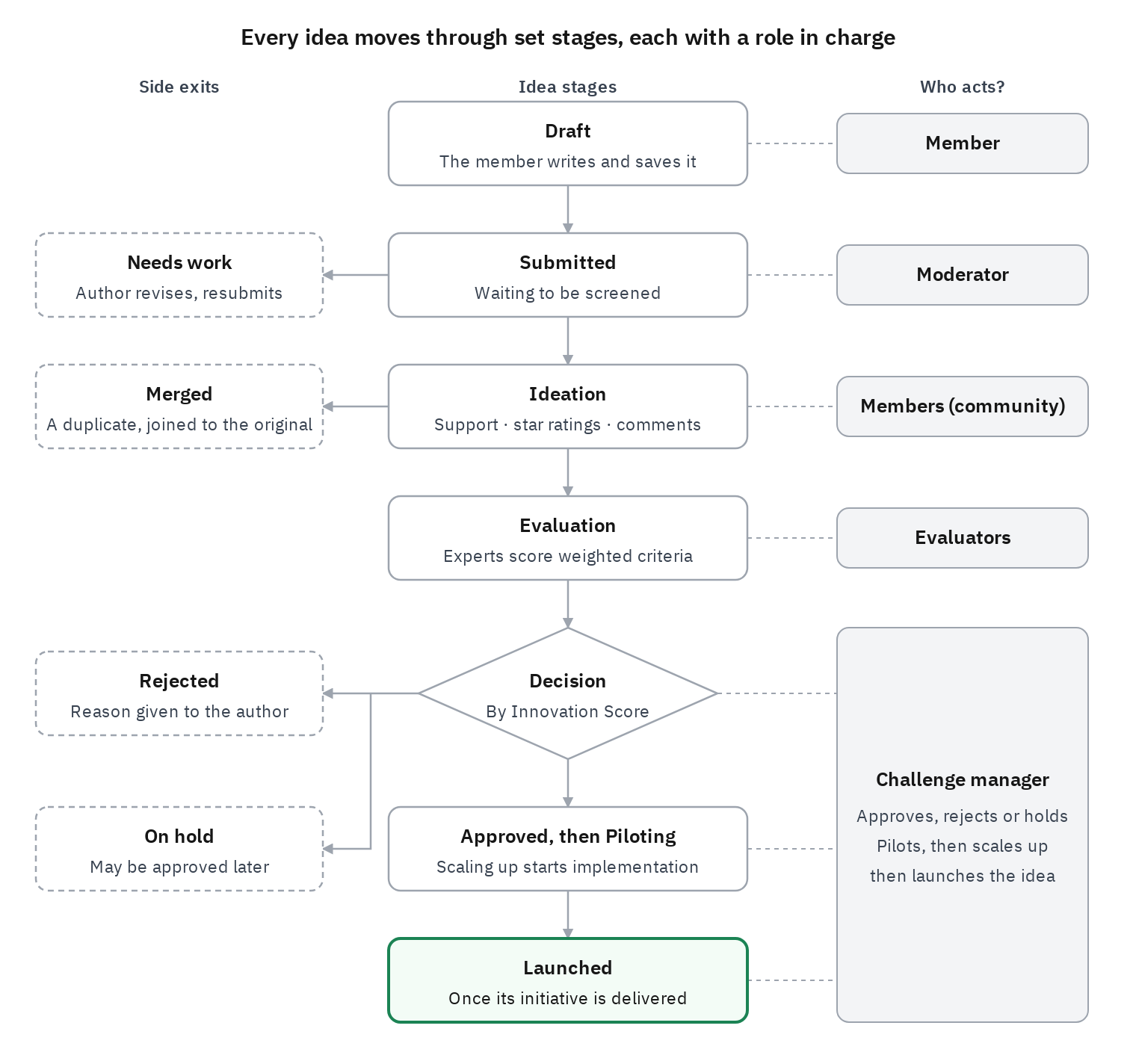
An idea can be archived from any stage except Piloting: a pilot ends only with a decision. Declining, rejecting, requesting changes and archiving cannot happen without a written reason that the author can see. Merging cannot happen without naming the original idea. The platform blocks any move that is not part of the path. Every move is recorded in a log that shows when it happened and who made it. The public sees it under the name "The platform team".
Strategic goals, targets and contributions
Each organisation has strategic goals for a period, with their innovation areas and an owner. Each goal is measured by one or more targets: a KPI with a unit, a direction, a baseline, a target value, a due date, an impact type (economic, social, financial or organisational), the beneficiary segments it concerns and how often it is read. Four standard impact measures stand beside them: riyals saved, working hours saved, people benefiting and beneficiary satisfaction. An idea names its contribution to at least one target before it can be approved — the target and the value expected after the solution — and a challenge passes the targets it serves to its ideas. The Strategic goals page shows each goal with the progress of each target.
Preliminary feasibility and the selection committee
For shortlisted ideas the innovation office (the challenge manager) prepares a preliminary feasibility sheet: the beneficiaries, the opportunity size, the estimated cost, the expected return, the risks and the go-to-market and rollout strategy, shown beside the problem and the solution as the idea itself states them. The opportunity size is one figure with a unit that says what it counts — beneficiaries a year, transactions a year, value a year in riyals, employees who would use the solution, or entities or sites that could adopt it — with where the figure comes from and how it was worked out. It is a column beside cost and return on the shortlist, so ideas the committee will compare use the same unit. The go-to-market and rollout strategy says who adopts the solution first, the channels that bring it to its users, the phases of its rollout from the first site to all of them, and what the rollout depends on. The figure, its unit and the strategy are required on every new sheet; sheets prepared before they were added read "Not on this sheet yet" until the innovation office completes them. Preparing the sheet puts the idea on the shortlist, which the members of the selection committee read with its sheets. After each session the innovation office records the date, the members present, the minutes and the committee's decision on each idea it discussed — selected for approval, selected for a pilot, needs further study, deferred, or not selected — with its reason. This is kept in the decision log and never edited, together with the sheet as it stood at the moment of the decision, opportunity size and strategy included, so what the committee read does not change if the sheet is edited afterwards. The decision shows on the idea's page to its author and the committee, and to the challenge manager in the decision box. Moving the idea along its path stays the challenge manager's decision, under its usual rules. The committee's members are told when an idea is put before them, of each decision recorded, and of what became of the idea afterwards.
Piloting before implementation
An approved idea is piloted before it is implemented: "Start a pilot" moves it to Piloting. Each pilot has a hypothesis, a prototype type (paper, screen mock-up, clickable prototype, physical model, service simulation or working version), its fidelity (low, medium or high), success criteria and dates, then its results, lessons learned and whether the criteria were met. The idea's author or a challenge manager records it, and an idea can have several pilots.
After the pilot the challenge manager takes one of four decisions: scale up, so implementation starts and the initiative opens; change course, so the idea keeps piloting with a new pilot; merge into another idea; or stop, so the idea is rejected. Each decision has a written reason the author can read, and is kept in the decision log with the pilots' results as they stood at the decision. Implementation starts only from a scale-up decision; when a pilot would add nothing (a proven solution, a regulatory obligation), implementation may start without one, with a written reason recorded in the decision log as well.
How the Innovation Score is calculated
The score runs from 0 to 100 and combines two sources:
| Source | Default weight | How it is calculated |
|---|---|---|
| Expert panel | 70% | The average of the evaluators' scores, weighted by criteria: Impact 35, Feasibility 30, Originality 20, Sustainability 15 |
| Community | 30% | From support and star ratings, using a statistical method that accounts for the number of participants (the lower bound of the Wilson interval) |
- Numbers matter: nine supporters out of ten beat one supporter out of one, even though the simple percentage says the opposite.
- Before the experts score: the score is the community's view alone.
- Evaluator disagreement: the challenge manager sees it in the score panel on the idea page. An average of 62 from four evaluators who agree is not the same as an average of 62 from evaluators split between 30 and 94.
- Weights can be changed: the administrator sets them, and each challenge can use a criteria set defined by the administrator, whose weights add up to 100.
How a challenge runs
A challenge has four states. The first three change automatically with the open and close dates. The fourth begins when the challenge manager publishes the results:
- Upcoming: announced, but not accepting ideas yet.
- Open: accepting ideas, with a countdown to the close date.
- Under evaluation: submissions are closed, its ideas have moved to evaluation, and the evaluators are at work.
- Closed: finished, with its results published.
From the start of implementation: the initiative
When implementation of an idea starts, the platform creates a linked initiative "In progress", and the initiative stays linked to its idea for good. The initiative has a description and an image, its own status (Planned, In progress, Delivered, Cancelled), an owning entity and a delivering body, a sponsor, a project lead and a team of platform users, a budget, and dated milestones. The idea's author and the initiative team are notified when the status changes and when each milestone is completed. The idea can be launched only once its initiative is "Delivered".
An initiative's projects: when an initiative is delivered through one or more projects in the organisation's project tool, the challenge manager or the project lead adds each one with "Add a project" under "Projects" on the initiative form, after the milestones, giving each its name, its start and end dates, and the targets it serves. A target is chosen from those the initiative contributes to, as last saved, and the platform refuses a project linked to a target the initiative does not contribute to, or one that ends before it starts. Projects are for reference only: they carry no tasks, progress percentages, costs or target values, so the figures stay on the initiative's contributions and their readings alone, and impact is never counted twice. "Projects" appears on the initiative page under its milestones, giving each project's name, dates and the targets it serves, and the periodic performance report lists each initiative's projects with their dates. The section is absent when the initiative has no projects, the usual case when the initiative is itself the project.
When implementation starts, the idea's contributions to targets move to the initiative, each with a baseline and the value expected after the solution. The initiative's team, including the project lead, records dated readings of the KPI's actual value, and the initiative page shows the latest actual value and the percentage achieved: (latest reading − baseline) ÷ (expected value − baseline), with each target's readings drawn over time beside their table. The published impact figures — riyals saved, working hours saved and people benefiting — are the latest readings on the standard impact measures, and they only count once the initiative is "Delivered", so that a forecast is not read as an achievement.
An initiative's progress combines its milestones and its targets: the share of milestones completed and the average percentage achieved by its contributions, weighted half and half unless the platform manager sets other weights. Each contribution is read on a schedule: the next reading falls due a number of months after the last one (six unless its target says otherwise), and readings continue after the initiative is delivered, to show the solution is still working. When a reading becomes overdue the project lead is notified once, and it appears on their dashboard and on the managers' list of readings due.
The roadmap: the Dashboard has a "Roadmap" tab beside "Portfolio by goal", for those who can see the portfolio. It shows the portfolio's own initiatives on a timeline, each once under its primary goal, so its count matches the portfolio's. Each initiative's bar runs from its start date to its end date and is coloured by its status, which is also written beside its name. The diamonds are its milestones on their due dates: a dark one is completed, a hollow one is to come, and a red one with a ring is overdue — its due date has passed and it is not completed. The vertical line is today, and a thin bar under the initiative stands for each of its projects. The roadmap is filtered by organisation, year, goal and initiative status, and the window is set by quarter with "From" and "To"; "Automatic" shows this year plus whatever is needed to show every initiative still under way. An initiative missing its start or end date is listed under "Without dates", with the reason, until its dates are completed on its form. Under the timeline a table holds the same initiatives, with each one's next milestone and its count of overdue milestones, and "Download as CSV" downloads it for the current filters. Dates are not edited on the roadmap, but on the initiative or in the project tool.
Corrective actions: a challenge manager or the project lead records on the initiative what must be done after a follow-up meeting or a performance report, with its owner, due date and reference. Actions are kept in the decision log and are never edited: marking one done or cancelled adds a new entry that follows it. The owner is notified once an action is overdue, and every corrective action appears in the periodic performance report.
Beneficiary feedback and satisfaction: while an initiative is in progress or delivered, members can write their feedback on its page; it is published once a moderator has reviewed it. Once the initiative is delivered, each member answers one question, once: how satisfied they are with the solution, from 1 to 5. Every night the average rating is recorded as a percentage, as a reading with the source "survey" on the initiative's contribution to the beneficiary satisfaction measure, so satisfaction has an expected value, readings over time and an export column like any KPI. The Dashboard shows participation by beneficiary segment.
The innovative solution card for Qiyas: when implementation starts, the idea's three parts — the problem, the proposed solution and how it addresses the problem — travel to the initiative with its beneficiary segments, emerging technologies, methodology, innovation type and output type. The challenge manager sets the solution maturity (concept, working model, proof of concept, trial version, in operation), and every change of stage is kept with its date and who made it. The initiative records the awards the solution received (name, granting body, scope, date and certificate) and the Qiyas cycles it was submitted in. The platform works out whether the solution may be submitted to a new cycle: in use for between six months and five years, not in planning or pilot, and not submitted in an earlier cycle unless a substantial development is recorded. The "What we delivered" page can be filtered by beneficiary segment, emerging technology and maturity.
Events: the annual plan, participants, certificates and reports
A challenge manager or content editor gives each organisation one annual events plan per year and adds its events: brainstorming, workshop, hackathon, competition, intensive innovation session or awareness. Each event has its goal, expected outputs, follow-up and evaluation method, owner, the methodology used, the challenge it puts forward, its planned date and then the date it was held, and its files and photos. The plan's page shows its completion rate — events held ÷ all the plan's events, a cancelled event counting as not done — and the plan exports as CSV.
Once the event is held, its owner records the participants — by name or account, with their segment, or by uploading a list (CSV); people who attended without being listed are counted per segment — and ranks the winners by place. Ideas are linked to the event they came from. Every participant with an account downloads their certificate (participation or achievement) as a PDF in Arabic or English. Each event's completion report is generated from its record — participants, expected against actual outputs, and the ideas that came out of it with what became of them — as a page and a PDF, and the Dashboard counts the events held by type.
Partnerships and their meetings
The challenge manager records each partnership: the partner and its type (government, private sector, academic or research, non-profit, international), the scope, the term, the organisation, the owner, the agreement document, and the challenges and initiatives it serves. Each meeting records its date, the people who attended from the platform and from outside, the minutes, and its outputs: studies, knowledge transfer, prototypes and proofs of concept. Corrective actions agreed in a meeting are recorded on the partnership like an initiative's, naming the meeting, and kept in the decision log. Partnerships are internal: only challenge managers and the platform manager see them. The quarterly partnership report (page and PDF) shows, for a period, the partnerships active, meetings held, outputs by kind and actions opened and closed; the list exports as CSV.
Methods, innovation type and output type
The method template library offers a ready-made template for each method — design thinking, GInI breakthrough innovation, the insight plan, brainstorming — with guidance on how to use it; the platform manager uploads the organisation's own files. A team attaches a filled template to an idea, an initiative or an event, and the Dashboard counts, per method, the ideas, initiatives and events that applied it. Each idea and initiative is also classified by innovation type (incremental, breakthrough, disruptive, transformational) and output type (technology, product or service, brand, marketing, customer experience, process); the portfolio by goal shows the share of each type per goal.
Connecting an organisation's project management tool
The technical administrator sets each organisation's delivery mode: managed in the platform, or in an external project tool. In external mode each idea approved in the organisation's challenges is sent once to its tool as a message signed with a shared secret, retried automatically if it fails, and the tool sends status, milestones, projects and target readings back to the initiative by its external reference; those fields become read-only on the initiative form. Challenge managers see the send log and the updates that could not be matched, among them any target the tool names for a project that the initiative does not contribute to, since the tool never adds a contribution to the initiative. The platform also offers organisations' systems a read-only API with OAuth tokens and scopes; every request is logged, and the "API documentation" page describes it to anyone signed in.
Qiyas evidence
Qiyas 5.0, perspective ten (research and innovation), asks for 52 items of evidence under standards 5.23.1 to 5.24.2. The table names, for each one, the page, report or export of the platform that serves it. Three items are documents the organisation itself writes — its strategy, its policies and its impact measurement methodology — so they are outside the platform; the table says what the platform offers beside them. Pages under "Manage the platform" open for the roles shown in the permission matrix.
| Item | Requirement | Where on the platform |
|---|---|---|
| 5.23.1-1 | Research and innovation in the digital transformation strategy | Outside the platform: the organisation's strategy document. The content editor can publish it as a page; its innovation goals are on the Strategic goals page. |
| 5.23.1-1 | Innovation areas | Strategic goals: each goal's innovation areas; challenges and ideas use the same categories. |
| 5.23.1-1 | Strategic innovation goals and indicators, and their alignment | Strategic goals with their targets (KPI, baseline, target value, due date) and progress; the portfolio by goal and its CSV. |
| 5.23.1-2 | Digital innovation initiatives and projects | What we delivered and each initiative's page, linked to its idea, with its projects in the organisation's project tool; the initiatives report under Manage the platform. |
| 5.23.1-2 | Initiatives aligned with priorities and targets | Each initiative's contributions to targets; the portfolio by goal. |
| 5.23.1-2 | Performance indicators of the initiatives' success | Targets, readings and progress on the initiative page; the periodic performance report (page and PDF). |
| 5.23.1-3 | Collaboration agreements with research and innovation bodies | Partnerships with the agreement document, and their CSV. |
| 5.23.2-1 | Annual events plan: goals, outputs and follow-up of each event | The annual events plan page with its completion rate and CSV; each event's goal, expected outputs and follow-up method. |
| 5.23.2-2 | At least two brainstorming sessions, documented | Brainstorming events on Innovation events, each with participants, outputs and its completion report (page and PDF). |
| 5.23.2-2 | Methodologies used and how they were applied | The method template library; filled templates on ideas, initiatives and events; an event's methodology; "Methods used" on the Dashboard and in the export. |
| 5.23.2-2 | Participants | Each event's participants; participation on the Dashboard; the export "participation by person". |
| 5.23.2-2 | Challenges and the solutions proposed | Challenges with their ideas and published results; each idea's timeline. |
| 5.23.2-2 | Prototypes developed (stages and results) | The pilots on each idea (hypothesis, prototype, fidelity, results) and the decision after the pilot, in the decision log. |
| 5.23.2-2 | Projects implemented from ideas | What we delivered: each initiative names the idea it came from. |
| 5.23.2-2 | Performance indicators and impact measurement | Targets and readings on each initiative; the standard impact measures on the Dashboard; the performance report. |
| 5.23.2-3 | Open innovation events (hackathons, competitions, workshops) | Innovation events of each type; events held by type on the Dashboard. |
| 5.23.2-3 | Numbers and segments of participants | Participants and attendance by segment on each event and in its completion report; participation by beneficiary segment on the Dashboard. |
| 5.23.2-3 | Certificates and lists of winning projects | Each event's winners by place and its certificates (PDF); each challenge's published results. |
| 5.23.2-3 | Impact of open innovation projects | An event's completion report lists the ideas that came out of it and what became of them; their initiatives' targets and readings. |
| 5.23.2-4 | Active agreements: meetings, outputs, reports and corrective actions | Each partnership's meetings, outputs and corrective actions; the quarterly partnership report (page and PDF). |
| 5.23.3-1 | An innovation unit or committee with roles and responsibilities | The roles and the permission matrix of this guide; the selection committee's role, shortlist and sessions. The decision forming the committee is the organisation's own document. |
| 5.23.3-2 | The unit's processes and procedures | The idea lifecycle and each role's journey in this guide; every move recorded on the idea's timeline. |
| 5.23.3-2 | Policies that support innovation | Outside the platform: the organisation's policy documents. The content editor can publish them as pages. |
| 5.23.3-2 | A mechanism to review ideas before implementation | Screening, a minimum of evaluations, the feasibility sheet, the selection committee and the pilot, each decision in the decision log. |
| 5.23.3-2 | Initiative cards with completion against performance indicators | The initiative page: progress from milestones and targets; the portfolio by goal; the roadmap with each initiative's span and its milestones completed and overdue; the performance report. |
| 5.23.3-2 | Decisions and corrective actions | The decision log and the corrective actions list. |
| 5.23.3-3 | Completion reports of culture events (at least three) | The completion report (page and PDF) of each awareness event. |
| 5.23.3-4 | The innovation management mechanism: the whole journey and each stage's procedure | The lifecycle diagram and the "How the platform works" section of this guide. |
| 5.23.3-5 | Automated receipt of innovative proposals | Idea submission (open, in a challenge or from an event), with notifications and tracking. |
| 5.23.3-5 | Automated receipt of feedback on innovative solutions | Beneficiary feedback and the satisfaction rating on initiative pages; the feedback list. |
| 5.23.3-5 | Different beneficiary segments | The account request with a beneficiary segment and its approval (Account requests); participation by segment on the Dashboard. |
| 5.24.1-1 | Solution name and description | The inventory of innovative solutions (Excel or CSV) and the initiative page. |
| 5.24.1-1 | Implementation cost, duration and launch date | The inventory: budget, start and end dates, launch date. |
| 5.24.1-1 | Target groups | Beneficiary segments of each solution; the inventory column; the filter of What we delivered. |
| 5.24.1-1 | Number of beneficiaries (expected or actual) | The beneficiaries measure: expected value and readings; the inventory's expected and achieved columns. |
| 5.24.1-1 | Emerging technologies used | The structured list on each solution; the inventory; the filter of What we delivered. |
| 5.24.1-1 | Achieved or expected impact on the organisation and beneficiaries | Each contribution's expected value against its latest reading; the inventory. |
| 5.24.1-1 | Solution stage (concept, model, proof of concept, trial, operation) | The solution maturity and its history on the initiative; the inventory. |
| 5.24.1-1 | Beneficiary satisfaction rate | The satisfaction rating recorded as readings; the inventory column. |
| 5.24.1-2 | The problem and how it is addressed | The three fields of the idea and the initiative: the problem, the proposed solution, how it addresses the problem. |
| 5.24.1-2 | Expected impact before and results after | Baseline, expected value and readings over time on the initiative page. |
| 5.24.1-2 | Eligibility (six months to five years, not in planning, not submitted before) | Qiyas eligibility of solutions and each initiative's eligibility with its reasons; the Qiyas cycles recorded. |
| 5.24.1-2 | Innovation methodology and source of the idea | The methodology field, the idea source recorded automatically, and the filled method templates. |
| 5.24.1-2 | Link to strategic goals and transformation plans | Contributions to the targets of strategic goals; the portfolio by goal. |
| 5.24.1-2 | Detailed data on the solution and reports of its implementation stages | The initiative page (milestones, projects, readings, corrective actions, attachments); the periodic performance report with each initiative's projects; the roadmap and its CSV. |
| 5.24.1-2 | The beneficiary segment | Beneficiary segments on the idea and the initiative. |
| 5.24.2-1 | Impact measurement methodology | Outside the platform: the organisation's methodology document. The platform applies it through targets with an impact type, a baseline, an expected value and readings on a schedule. |
| 5.24.2-1 | Target groups and types of impact before and after | Each target's impact type (economic, social, financial, organisational) and segments, with baseline and readings. |
| 5.24.2-1 | Adoption of data analytics | The Dashboard, the portfolio by goal, the reports, the CSV and Excel exports and the API. |
| 5.24.2-2 | Impact on beneficiaries, financial impact and impact on the organisation | The standard impact measures (people benefiting, riyals saved, hours saved, satisfaction) and the targets by impact type; totals on What we delivered. |
| 5.24.2-3 | Sustainability of the innovative solution | Readings continue after delivery on a schedule, with overdue alerts; maturity "in operation". |
| 5.24.2-4 | Local, regional and international awards | The awards on each initiative (scope, granting body, date, certificate); the inventory column. |
In all, 49 of the 52 items are served by a page, report or export of the platform, and 3 are the organisation's own documents.
Glossary
| Term | Arabic | Meaning on the platform |
|---|---|---|
| Achievement | نسبة التحقق | (latest reading − baseline) ÷ (expected value − baseline) |
| Annual events plan | الخطة السنوية للفعاليات | An organisation's events for one year, with its completion rate |
| Award | الجائزة | An award a solution received: name, granting body, scope, date and certificate |
| Badge | الشارة | An award a member earns on reaching a set achievement |
| Baseline | خط الأساس | A KPI's value before the solution |
| Beneficiary segment | شريحة المستفيد | Citizen, resident, employee, business, person with a disability or older person |
| Blind evaluation | التقييم المستقل | An evaluator sees neither colleagues' scorecards nor the panel's score until they have sent their own |
| Challenge | التحدي | A time-limited call for ideas on a specific problem |
| Completion report | تقرير الإنجاز | An event's report generated from its record |
| Contribution | المساهمة | What an idea or initiative is expected to move on a target: baseline and expected value |
| Corrective action | إجراء تصحيحي | What must be done after a follow-up or a report, with an owner, a due date and a reference |
| Criteria set | مجموعة المعايير | The evaluation criteria and the weight of each, adding up to 100 |
| Decision log | سجل القرارات | The record of every decision, with the scores at that moment, that is never edited |
| Delivery mode | وضع التنفيذ | Whether an organisation runs implementation in the platform or in its own project tool |
| Event | الفعالية | A brainstorming session, workshop, hackathon, competition, intensive session or awareness event |
| Feasibility sheet | مخطط الجدوى الأولية | The beneficiaries, opportunity size, estimated cost, expected return, risks, and go-to-market and rollout strategy of a shortlisted idea |
| Idea | الفكرة | A proposal submitted by a member, on its own, in a challenge or from an event |
| Idea lifecycle | دورة حياة الفكرة | The defined stages an idea goes through, from draft to launch |
| Initiative | المبادرة | An approved idea turned into an implementation project with measured impact |
| Initiative project | مشروع المبادرة | A project in the organisation's project tool through which an initiative is delivered: its name, dates and the targets it serves, for reference only and without figures |
| Innovation Score | مؤشر الابتكار | A score from 0 to 100 that combines the community's view and the experts' judgement |
| Innovation type | نوع الابتكار | Incremental, breakthrough, disruptive or transformational |
| Merge | الدمج | Linking a duplicate idea to the original idea and counting its support towards the original |
| Method template | القالب المنهجي | A ready-made template of a method, filled in and attached to an idea, initiative or event |
| Moderation queue | قائمة الإشراف | The ideas waiting for a moderator's decision |
| Output type | نوع المخرج | Technology, product or service, brand, marketing, customer experience or process |
| Partnership | الشراكة | A collaboration agreement with a research, development or innovation body |
| Pilot | التجربة | A small-scale test of an approved idea, with a hypothesis, a prototype and success criteria; the stage is called Piloting (قيد التجريب) |
| Portfolio by goal | المحفظة حسب الهدف | Ideas and initiatives counted once each under their primary goal |
| Project lead | قائد المشروع | The person who runs an initiative and records its readings and corrective actions |
| Publish to community | إجازة للطرح | The moderator's decision that an idea is fit to be shown to the community |
| Qiyas eligibility | الأهلية لقياس | Whether a solution may be submitted to this year's Qiyas cycle, with the reasons |
| Reading | القراءة | A dated actual value of a target's KPI |
| Reputation ledger | سجل النقاط | An append-only record that explains where every point in a member's balance came from |
| Roadmap | خارطة الطريق | The portfolio's initiatives on a timeline by goal, with their milestones and projects |
| Scorecard | بطاقة التقييم | An evaluator's score form for one idea, with a score for each criterion |
| Selection committee | لجنة الاختيار | The committee that chooses among shortlisted ideas on the strength of their feasibility sheets |
| Solution maturity | مرحلة نضج الحل | Concept, working model, proof of concept, trial version or in operation |
| Strategic goal | الهدف الاستراتيجي | An organisation's goal for a period, measured by targets |
| Support | الدعم | One vote per member on an idea, which can be withdrawn |
| Target | المستهدف | A KPI with a unit, a baseline, a target value and a due date, measuring a strategic goal |